Trading Places takes place within the holiday season, with two of the big moments happening on Christmas and New Year’s Eve; does this make it a holiday movie? I suppose it might, although unlike Die Hard and a couple of other films, no one has ever made make a huge stink on the Internet about it. The Die Hard question was solved once they started making Hans Gruber advent calendars, although ironically it is Trading Places that is actually all about someone’s fall, albeit in personal circumstances, not from the top of a skyscraper.
The fall in question is that of Louis Winthrope, a smug young man from old money, played by Dan Ackroyd at his most unctuous. Winthorpe is the classic example of someone being born on third and thinking he’d hit a triple. He’s got a job as a commodities trader at the venerable Duke & Duke firm, has a great townhouse complete with butler (both paid for by his company), and he’s affianced to the sleek-haired Penelope, who looks like she models for the LL Bean catalogue (and as Kristin Holby, who played her, was indeed a fashion model, she may well have). Everything’s coming up Winthorpe!
Until he literally bumps into Billy Ray Valentine (Eddie Murphy, in his second movie role), a fast-talking but not especially successful street con. Valentine’s trying to avoid the police when he collides with Winthrope, and he picks up the trader’s fallen briefcase to return it to him. Winthorpe panics because he’s a soft white man, and screams for the police. Valentine runs into the stuffy private club Winthorpe just came out of, and finds himself arrested; Winthrope, who demands to press charges against Valentine, is hailed as a hero by his fellow finance bros.
None of this escapes the attention of Mortimer and Randolph Duke, the heads of the firm. Randolph in particular believes that Billy Ray’s general misfortune is the product of his deprived environment; Mortimer, the more openly racist of the two, thinks it’s due to race. The two make a wager on it: They will raise up Valentine and humble Winthorpe, and see whether circumstances make the man, or not.
And thus does Winthorpe fall, and hard. And equally, Valentine rises, to become the toast of Philadelphia’s financial elite. obviously, Winthorpe and Valentine are destined to collide again later in the film, as the facts of what has happened to them both, and why, come out.
Trading Places is a very funny movie, but there are lots of very funny movies that don’t end up being the fourth-highest-grossing film of their year, in a year that also has a Star Wars movie (Return of the Jedi) and a James Bond flick (the egregiously-named Octopussy). Funny or not, neither the story nor script of Trading Places is so revolutionary or consistently hilarious that in themselves they should have been expected to be near the top of the end of the year charts.
What Trading Places had going for it was heat, particularly in the form of Eddie Murphy. It’s hard for the couple of generations of adults who know Eddie Murphy from the Shrek franchise and/or a run of undistinguished and indistinguishable comedies in the late 90s and early 2000s to really appreciate just how much of a generational talent Murphy was seen as in the 80s, especially in the first half of the decade. He was to comedy what Michael Jackson was to music (a comparison that doesn’t sound that great here in the third decade of the 21st century, admittedly, but still apt). Trading Places got him on the upswing of that, coming in hot from the critical and commercial success of the film 48 Hours, and from him being literally the only reason people watched Saturday Night Live in the early 80s (sorry, Joe Piscopo).
Murphy was so hot in this era that when he branched out into a pop music career in 1985, his (deeply underwhelming in retrospect) song “Party all the Time” actually went to #2, stopped only by the pop behemoth that was Lionel Richie. Not everything Murphy touched in this era turned to gold (see: Best Defense, or, actually, please don’t), but it took a lot for it not to, and Trading Places was more than good enough on its own.
Also! The film was directed by John Landis, who was himself in the middle of a run of remarkably popular films, starting with Animal House and continuing on through The Blues Brothers and An American Werewolf in London, and Dan Ackroyd, while less white-hot than his director and co-star, had seen a big hit in the Landis-directed The Blues Brothers and had residual audience affection from his SNL days. Jamie Lee Curtis, as Ophelia, the streetwalker who takes pity on Winthorpe, was mostly known as a “scream queen” but was ready to show her range, and her body, in this film. Neither were to be discounted.
Basically, everyone involved would have had to work really hard to fuck this one up. They did not.
More than that, it turned out that Ackroyd’s ability to project smarmy self-satisfaction first contrasted and then meshed perfectly with Murphy’s antic hustle, with Curtis’ surprising warmth grounding the two of them. Landis’s direction doesn’t show the hallmarks of greatness here, but with this cast it didn’t have to; it mostly had to not get in the way. The story hits all the marks in Winthorpe’s and Valentine’s respective fall and rise, their eventual understanding of what’s happening, and their decision to set things right — through insider trading, as it happens. What a gloriously ambiguous way to secure a comeuppance!
But the comeuppance is what we’re here for, and it’s what resonantes in the film, first in the Reagan era and now in our oligarch one, and what makes it a fulfilling rewatch.
Viewers coming new to this film in 2025 or later are hereby put on notice that there are several parts of this film that have aged extremely poorly, none more than the film’s fourth act, which features Dan Ackroyd in blackface, sporting a frankly terrible Jamaican accent, not to mention non-consensual encounters with great apes. This is a recurring curse of 80s comedies, where casual racism/sexism/etc is part of the background radiation of the time.
The flip side of this is that some folks might grump that this is why “you couldn’t make this film today,” which is nonsense, and not true — none of the casual racism, sexism, etc is needed for the story, and could be chucked aside for new and better jokes and writing. The intentional racism of the film, in the form of the Duke brothers and their terrible bet, on the other hand, is at the heart of the tale, and is, alas, as relevant today as it was 40 years ago, now that we have tech dudes running around trying to make eugenics happen all over again.
In fact, it might be time for another filmmaker to take a new swing at the Trading Places concept, this time having it take place in Silicon Valley, with the bet makers being tech bros who wager a single crypto coin, or whatever. I think there would be an audience for seeing some of this new generation of terrible rich people getting theirs at the hands of the people whose lives they are trying to destroy. These days, as in the 80s, you would have to work real hard for that not to be a hit. Set it during the holiday season, too. Let these turkeys get stuffed.
Akamai proved its resilience and scale by handling an 80% increase in traffic during the busiest shopping time of the year: Black Friday and Cyber Monday.
I think it’s important to note, when writing a series of essays about “comfort watches,” that not every movie on that list is going to be a comfortable watch. Some of them might even be hard-“R” movies with lots of violence, portraying a decaying civilization where law is rare and order is even more so, and where everyone in the movie is pretty much just hanging on by their fingernails. These movies are not nice! Nevertheless there is something relentlessly rewatchable about them, something that makes you just settle in on the couch for a couple of hours with a smile on your face, maybe because you’re sure glad you don’t live there. For me, Dredd is one of those films. The world of Mega-City One is a terrible place and I hope never to take up permanent residence, but I’m happy to visit. That is, from behind a pane of bulletproof glass.
For those of you not familiar with the 2000 AD comic feature on which the film is based (and have otherwise and correctly blocked the painfully bad 1995 Sylvester Stallone film made from the same source material from your brain): The world is fucked and irradiated and almost all of it is a wasteland, except Mega-City One, with 800 million people stretching across the Acela Corridor of the United States. Most people there live crappy lives in “megablock” apartment complexes that can house 50,000 people, and along with residents, are filled with crime and drugs. Law enforcement is sparse and in the hands of “Judges,” empowered both to stop and punish crime at the same time. Basically, life sucks, and if you do crime, you’re likely to get away with it, but when you don’t, some extremely well-armed dude is going to shoot you in the head about it. Fun!
The titular character, Dredd, is a judge, who never takes off his helmet and rarely speaks more than a sentence at a time. He’s assessing a trainee judge named Anderson, who also happens to be psychic (in the Judge Dredd mythology there is a whole thing about mutants and such, and it’s not really more than waved at here). Dredd and Anderson enter a megablock after a drug-related crime, which for various reasons annoys the local drug lord named Ma-Ma; she locks down the entire megablock and puts a hit out on the judges. From there, things get real messy, real quick.
As noted earlier, this comic book material was made into a movie before, in 1995. It just did not work, not in the least because it was far more of a Sylvester Stallone vehicle than a Judge Dredd movie — here’s Stallone galumphing around without his helmet so you can see his face, complete with overly-blue contacts, here’s Stallone tromping through a bunch of sets that look like sets, not slums, here’s Stallone bellowing Dredd’s catchphrase “IYAMDELAW” with scenery chewing abandon, and being saddled with Rob Schneider as comedy relief because it was the 90s and apparently that was just what was done back in the day. This movie was made by Hollywood Pictures, which at the time was Disney’s off-off-brand, and while the movie was rated “R,” every inch of it gave off a soft PG-13 vibe. This was a movie that yearned for its hero to be made a figurine in a McDonald’s happy meal.
Dredd, which came out in 2012… is not that. From the opening moments, Dredd makes it clear that this future, shot on location in South Africa, is literally trash; everything is run-down, nothing is new, the color scheme is graded heavily into sicky yellows and greens (except for the blood, which is super, super red). This Mega-City One doesn’t feel like a bunch of sets; it’s ugly and tired and feels all-too possible. Dredd himself, played by Karl Urban, is night and day from the Stallone iteration. When he says “I am the law,” it’s not a bellow. It’s a deeply scary intonation of facts. And he never takes off his damn helmet.
It helps that Dredd isn’t trying to do too much. The movie isn’t trying to jam in seven different storylines and five movies’ worth of worldbuilding into a single film. It keeps to a single story, a single day, and, mostly, a single location. After a brief opening voiceover, you learn about the world diagetically. For longtime fans of the Judge Dredd world, there are little easter eggs here and there but nothing that winks at the viewer. For everyone else, you learn just enough of what you need to get through the story, and everything else is atmosphere. The story is economical, partly because it had to be — the film had a budget of no more than $45 million, half of what the 90s version had to work with more than two decades earlier — but also partly because Alex Garland, who wrote the script (and who largely edited the movie after it was shot) was smart enough to realize every thing he wanted and needed to say about this world could be done with one, admittedly extreme, bad day in the life of its protagonist.
And what is there to say about Dredd himself? Largely that Urban plays him not as a star vehicle but as an archetype. Urban’s Judge Dredd could hang out with Clint Eastwood’s Man With No Name quite handily. The two of them wouldn’t say much, but they wouldn’t have to; like understands like. Dredd doesn’t explain himself, has no extended monologues that are a journey into his interior life, and there is no indication that, when he is off the clock, he does anything but stand in a room, silently, waiting for his next shift. In the movie, Dredd isn’t focused on anything other than what’s directly in front of him, and Urban isn’t focused on anything other than getting Dredd to his next scene. Now, you can argue whether Urban’s low and mostly emotionless growl in this film constitutes good acting in a general sense. I don’t think you can argue it isn’t just about perfect for what the character is supposed to be, in the context of the film.
Judge Dredd, the comic book, is known to be a satire of both US and British politics and both nations’ rather shameful but continual flirtation with fascism, but as George S. Kaufman once said, satire is what closes on Saturday night. Even when one acknowledges that satire doesn’t have to be overtly funny, and is often more effective when it is not, there is nothing about Dredd that feels particularly satirical. Garland’s version of Mega-City One doesn’t present as satire or even as a cautionary tale; it just feels like a fact. Shit went bad. This is what’s left.
There is no world in which individuals should be walking around, embodying an entire legal process whole in themselves. “I Am The Law” is the very definition of authoritarianism and in the real world should be actively and passionately fought against. In Dredd’s world, however, this battle has already been fought, and lost. You get the law you get, piecemeal and not enough of it, and if you’re not actively a criminal, you’re happy with what little you get at all.
This is not a world I ever want to live in, and I will be happy to spend the rest of my life fighting against anything like it. But as a spectator, it’s fascinating, and in Dredd, it feels close enough to real to pack a punch. Everything in Dredd is some flavor of bad; everyone in Dredd is some level of desperate. No one is happy and everyone is looking for an escape of some sort. In this context, Judge Dredd is a strange and compelling constant. He’s not happy or sad, or fearful or mad. He is, simply, the law. That’s all he is. That’s all he needs to be.
Akamai Media Services Live 4 will be discontinued on December 31, 2026. The upgraded Akamai Media Services Live 5 is currently in general availability.
Dec 5, 22:55 UTC Resolved - After further investigation it was determined that this issue is not causing any customer impact or service disruption, we apologize for the confusion.
Dec 5, 17:48 UTC Investigating - Our team is investigating an emerging service issue affecting Object Storage in it-mil (Milan, Italy). We will share additional updates as we have more information.
For the last four days, the 2025 Whatever Gift Guide has been about helping you find the perfect gifts for friends and loved ones. But today I’d like to remind folks that the season is also about helping those in need. So this final day is for charities. If you’re looking for a place to make a donation — or know of a charitable organization that would gladly accept a donation — this is the place for it.
How to contribute to this thread:
1. Anyone can contribute. If you are associated with or work for a charity, tell us about the charity. If there’s a charity you regularly contribute to or like for philosophical reasons, share with the crowd. This is open to everyone.
2. Focus on non-political charities, please. Which is to say, charities whose primary mission is not political — so, for example, an advocacy group whose primary thrust is education but who also lobbies lawmakers would be fine, but a candidate or political party or political action committee is not. The idea here is charities that exist to help people and/or make the world a better place for all of us.
3. It’s okay to note personal fundraising (Indiegogo and GoFundMe campaigns, etc) for people in need. Also, other informal charities and fundraisers are fine, but please do your part to make sure you’re pointing people to a legitimate fundraiser and not a scam. I would suggest only suggesting campaigns that you can vouch for personally.
3. One post per person. In that post, you can list whatever charities you like, and more than one charity. Note also that the majority of Whatever’s readership is in the US/Canada, so I suggest focusing on charities available in North America.
4. Keep your description of the charity brief (there will be a lot of posts, I’m guessing) and entertaining. Imagine the person is in front of you as you tell them about the charity and is interested but easily distracted.
5. You may include a link to a charity site if you like via URL. Be warned that if you include too many links (typically three or more) your post may get sent to the moderating queue. If this happens, don’t panic: I’ll be going in through the day to release moderated posts. Note that posts will occasionally go into the moderation queue semi-randomly; Don’t panic about that either.
6. Comment posts that are not about people promoting charities they like will be deleted, in order to keep the comment thread useful for people looking to find charities to contribute to.
All right, then: It’s the season of giving. Tell us where to give to make this a better place.
There are many ways to die in this world, roughly as many ways as there are to live, but there is one thing I know for sure: I do not wish to die the way Daniel Miller (Albert Brooks) dies in Defending Your Life. One, he dies on his birthday, which, while it makes for a tidy headstone, is a terrible way to spend the one day of the year that is all about you. Two, he’s just bought a car, and he’s not going to get to enjoy it. Three, he dies listening to Barbra Streisand, and, no disrespect to Ms. Streisand, but there’s nothing in her oeuvre that I wish to slip the surly bonds of Earth to. The last song Daniel hears is “Something’s Coming”; the title, at least, turns out to be prophetic.
And then Daniel is dead, and where he goes is neither heaven nor hell, and not even purgatory or limbo. He has arrived in Judgment City, which looks rather a bit like Orange County, and which processes all the dead of the Western United States. Judgment City has some nice perks, like the fact that humans who arrive there can eat all the food they want and never gain weight, and also it’s the best food they’ve ever had. But there are drawbacks, too, like the fact that everyone has to wear bulky white caftans, and also that one has to make a good argument for how they’ve lived their life on Earth. If it goes well, they move on. If it goes poorly, they go back to Earth. If it goes really poorly, the universe throws them out.
You’re on trial for your life, in other words, and because this way station is both bureaucratic and strangely Calvinistic, there are subtle hints about how your trial is going to go before you even step into the courtroom. To begin, how is your hotel? If you’re at the afterlife equivalent of the Four Seasons, you’re probably fine. If you’re at something like a bog-standard Marriott, it could go either way. If you’re at the equivalent of a Motel 6, get ready to go back. Likewise, the number of days of your life that the trial will examine is a good hint how things will go; the fewer the better.
Daniel, who is a sharp study, immediately wants to know where he falls on the “go on or go back” spectrum, which amuses Bob Diamond (Rip Torn), his appointed counselor. Mind you, everything about the humans coming through Judgment City amuses the staff there; they are ascended beings who use forty to fifty percent of their brains, unlike the humans, who use five percent at most. The staff of Judgment City look at humans like humans look at clever pets or precocious toddlers. They want good things for them! But they’re not going to socialize after hours or anything.
What Daniel mostly gets from all of this is that some people are shoo-ins to move on, and some people are, to put it nicely, going to have to work for it, and Daniel is in the latter category. Daniel was not a bad person on Earth; he was nice enough and well-liked by co-workers, even if he didn’t have a lot of what you would actually call friends. But in Judgment City, there’s the belief that when you use as little of your brain as humans do, you are ruled by your fears, and Daniel… well. He’s very human.
There’s more going on in this movie, including a budding romance between Daniel and Julia, a woman who may be too good for him, the first clue of that being that she is played by Meryl Streep. But what makes Defending Your Life work for me is both the teleology and the philosophy of Judgment City, as laid out by Brooks, who in addition to starring in the film, also wrote and directed it. Brooks has posited possibly the most practical afterlife ever, a fact that I think is easy to overlook as the story chugs along.
I don’t personally believe in an afterlife, but if I were going to believe in one, this is very close to the one I would believe in — not a place of perfect peace or eternal damnation, but basically a performance review to see how you did in the place that best suited your personal development. If you go on, great — the next place has a new set of problems and challenges for you to experience, solve and learn from. If you need more time back on Earth, that’s fine too — like the California Bar, not everyone passes the first time, and there’s no shame (at least at first) going back and trying again until you get it right. Is there a God? Who knows? Judgment City is not here to answer that. What it’s here to answer is: Are you ready for what comes next?
Well, that’s nothing new, I hear you say, that’s just Buddhism with extra steps. And, well, maybe it is, and if it is, then it makes sense that fear would be the thing that reattaches you to Earth, the thing you have to eventually let go of in order to move on. We are at this moment living in an era where large numbers of people are motivated by their fears, and others derive their power by making people afraid of other people, including their neighbors. I think if the afterlife is anything like it’s depicted here, there are going to be a fair number of people who currently live well who, in the afterlife, are going to be surprised to be staying at a seedy roadside motel, looking at a month’s worth of days of their life. At least the snacks will be great.
Brooks may or may not just be giving the eternal wheel of suffering a new spin, but whatever he’s doing, he’s being smart and funny about it. Brooks’ Daniel is a slightly depressed everyman who is more clever than he is good, someone who is willing to settle even when, in his heart, it’s not what he wants. It gives Daniel a sort of melancholy that’s both approachable (you can see why his co-workers like him) and also a lot to deal with (which is why he doesn’t have a lot of friends).
He’s relatable, and I think a lot of us can see at least a little of ourselves in him. As director, writer and star, Brooks only rarely goes for the laugh-out-loud moment in this film. But over and over again, there are rueful chuckles. You’ll laugh with this film, and you might wince in self-recognition as well. Ultimately, Daniel will have to work for his happy ending, and it’s never obvious whether or not he will get it. And that, too, is like life.
Defending Your Life makes me laugh, but it’s also made me think about my own choices and my own fears in this life. I can say that there have been a few times where I thought about this film when I was on the verge of having to make choices about where my own life was heading. There is a scene in the film where Daniel is up for a job, and he wants a specific salary. He has his (then) wife pretend to be the job interviewer, and they spar over the salary he will accept. Then he goes to meet the actual guy, and takes the first number thrown out at him, even though it’s far below what he actually wanted. We see his face when he realizes what he’s done. He let his fear get in the way of what he wanted, and he knows it.
I thought about that scene a few years later, when I was working as a film critic at the Fresno Bee newspaper. At one point, I was up for a film critic job at the St. Paul Pioneer-Press, and it came down to me and one other writer. I had informed the Bee that I was up for the job, and they were waiting to find out whether I would take the job or not. If it was offered to me, it would come with a largeish bump in pay, which was something I kind of needed; the Bee was a lovely place to work, but they didn’t pay me a lot and weren’t inclined to give me more.
Spoiler: I did not get the job. When I didn’t, I could have just gone back to work like nothing ever happened, without the raise I wanted and needed. Or, I could raise on a busted flush — after all, the Bee didn’t know (yet) that I didn’t get the job. I went into my Managing Editor’s office to tell him what happened with the St. Paul offer, and the first thing I said to him as I came through the door was “give me a twenty-five percent raise and a weekly column, and I’ll stay.” If he said no, I was screwed, because I had implied I had gotten the other job. But I chose to stuff that fear down, and ask for what I needed and wanted.
Second spoiler: He said yes to my proposal and told me he was glad I was going to stay. I thanked him, went to the men’s room in the hall, slipped into one of the toilet stalls, sat down and had a nice five-minute nervous breakdown before going back to my desk and back to work. I had faced my fear, and I had got what I wanted. And it’s made a difference in how I’ve lived my life since then.
I owe Daniel, and Albert Brooks, and Defending Your Life for that. We’ll see what sort of hotel upgrade that gets me in the afterlife. I’d still rather not be listening to Streisand when I go, however.
Dec 5, 00:40 UTC Resolved - We haven't observed any additional issues with the Cloud Manager or API, and will now consider this incident resolved. If you continue to experience issues, please contact us at 855-454-6633 (+1-609-380-7100 Intl.), or send an email to support@linode.com for assistance.
Dec 4, 20:14 UTC Update - There was a recurrence from 19:28 UTC to 19:42 UTC because our third party experienced issues again while working on their end. We can confirm the issue is no longer happening at this moment. We are continuing to monitor for any further issues.
Dec 4, 19:12 UTC Monitoring - At this time we have been able to confirm the issue affecting the Cloud Manager and API was related to a vendor having issues on their side, these issues have been fixed on their end and our services are back on line as of 18:55 UTC. We will be monitoring this to ensure that the service remains stable. If you are still experiencing issues and unable to open a Support ticket, please call us at 855-454-6633 (+1-609-380-7100 Intl.), or send an email to support@linode.com.
Dec 4, 18:50 UTC Update - We are continuing to investigate this issue.
Dec 4, 17:43 UTC Investigating - Our team is investigating a service issue affecting the Managed Databases service. During this time, users may experience issues when attempting to configure, update, provision, and view Managed Databases via the Cloud Manager or Linode API. Existing Managed Database cluster operations are not affected.
We will share additional updates as we have more information.
For the first three days of the Whatever Gift Guide this year, We’ve had authors and creators tell you about their work. Today is different: Today is Fan Favorites day, in which fans, admirers and satisfied customers share with you a few of their favorite things — and you can share some of your favorite things as well. This is a way to discover some cool stuff from folks like you, and to spread the word about some of the things you love.
Fans: Here’s how to post in this thread. Please follow these directions!
1. Fans only: That means that authors and creators may not post about their own work in this thread (they may post about other people’s work, if they are fans). There are already existing threads for traditionally-published authors, non-traditionally published authors, and for other creators. Those are the places to post about your own work, not here.
2. Individually created and completed works only, please. Which is to say, don’t promote things like a piece of hardware you can find at Home Depot, shoes from Foot Locker, or a TV you got at Wal-Mart. Focus on things created by one person or a small group: Music, books, crafts and such. Things that you’ve discovered and think other people should know about, basically. Do not post about works in progress, even if they’re posted publicly elsewhere. Remember that this is supposed to be a gift guide, and that these are things meant to be given to other people. So focus on things that are completed and able to be sold or shared.
3. One post per fan. In that post, you can list whatever creations you like, from more than one person if you like, but allow me to suggest you focus on newer stuff. Note also that the majority of Whatever’s readership is in the US/Canada, so I suggest focusing on things available in North America. If they are from or available in other countries, please note that!
4. Keep your description of the work brief (there will be a lot of posts, I’m guessing) and entertaining. Imagine the person is in front of you as you tell them about the work and is interested but easily distracted.
5. You may include a link to a sales site if you like by using standard HTML link scripting. Be warned that if you include too many links (typically three or more) your post may get sent to the moderating queue. If this happens, don’t panic: I’ll be going in through the day to release moderated posts. Note that posts will occasionally go into the moderation queue semi-randomly; Don’t panic about that either.
6. Comment posts that are not about fans promoting work they like will be deleted, in order to keep the comment thread useful for people looking to find interesting gifts.
Got it? Excellent. Now: Geek out and tell us about cool stuff you love — and where we can get it too.
I never quite got Brian De Palma. An unquestionably talented director, he knew how to make a hit — see Carrie and the first Mission Impossible film — and if he was going to fail, he was going to do it on a scale so grand that people would write books about it (The Bonfire of the Vanities). He was brash, steeped in film lore, and more than happy to make sure you knew when he was showing off, which was often; what were Body Double and Blow Out other than him paying homage to, and then trying to one up, Hitchcock and Antonioni? The chutzpah! The actual brass balls on this guy!
Some people loved it (Pauline Kael, for one, seemed to eat it up, and who was going to argue with her), but I was, and, I have to say, still am, largely unimpressed. Scratch a De Palma film and you’ll very often find there’s no there there — it’s mostly just surface flash and thrill and some very intentional shock and subversion, all very mannered and very little with any resonance. Outside of Carrie — which made household names out of De Palma, Stephen King and Sissy Spacek all in one go — it’s debatable that De Palma ever made a truly classic movie, a world-beating piece of celluloid that is studied for its quality over its kitsch.
(And yes, my dudes, I see you standing up on a table full of cocaine, beating your chest over Scarface and telling me to say hello your little friend. Grand Guignol as it is, what it has going for it is excess. It’s a lot, and I found it tiring, and when Tony Montana finally ended up face down in the water, what I remember thinking was good, now I get to go home.)
So: Brian De Palma. Mostly, not for me! Maybe for you, fine, okay, you do you! But not for me!
Ahhhh, but then there’s The Untouchables. And suddenly, for length of this one single film, Brian De Palma is indeed very much for me.
Come with me now to 1930 Chicago, smack dab in the middle of prohibition, and Treasury Officer Elliot Ness (Kevin Costner, stalwart) has come into town to take on the bootleggers and gangsters, two groups with, shall we say, a rather substantial overlap. Ness has little success at it until he comes across beat cop Jimmy Malone (Sean Connery, the most Scottish Irish cop ever), who knows where all the bodies are buried around town, and where the rum is being run. Together with their small and select team (Andy Garcia, in one of his first big roles, and Charles Martin Smith as comedy relief, until he isn’t), they take on Al Capone (Robert De Niro) the celebrated gangster who is loved by the press, despite the fact that he’ll happily blow up a kid or two if that’s what it takes to keep his grip on the town.
It’s a rich setting, and of course this film is not the first time the prohibition era had been essayed — heck, The Untouchables itself was an update of a late 50s TV series starring Robert Stack. The film was treading a path that had been trod upon many times before. This reappraisal and reinvention of film and television tropes was nothing new to De Palma, who had by this time had homaged directors and source material, including Scarface (originally a 1932 movie starring Paul Muni), and he would go on to retread Mission Impossible. The Untouchables, as a property and as a mode of storytelling, was old hat, both for De Palma or for the culture at large. So what is it that sets this movie apart?
Weirdly — no really, weirdly, because this is a film where one character bashes in the head of another character with a baseball bat — I think what makes this film work is restraint. Brian De Palma is Brain De Palma-ing himself all over this film, with all his stylistic tics and touches and his oh-look-do-you-see-how-I’m-referencing-Eisenstein-aren’t-I-so-very-clever-ness, but he’s doing it at about an 8, rather than an 11. Yes, there is that (rather famous) scene involving a baseball bat, but here’s the thing: what makes it shocking isn’t the assault, it’s the context. De Palma shows us enough of the assault (and the aftermath) to make the point, but, unlike, say, Scarface, there’s no lingering. De Palma gets in, gets what the scene needs, and gets out.
Now, I am going to accept there is skepticism for this thesis of mine. The Untouchables does not exactly skimp on the blood or the occasional shot of someone’s brains all over a window pane. This is a movie that rather handily earns it “R” rating. But my argument is that in these cases it’s not about quantity, it is about quality. Those brains on the window pane are actually in service to the story. They are just enough to fill in the scene, and then we’re moving on. For De Palma, for whom so much of his directorial style is basically more, of whatever it is, not just blood although certainly blood too, this sort of restraint in the service of story feels a little revolutionary. Turns out you can do a whole lot, if you’re not trying to bludgeon your audience into sensory overload.
De Palma didn’t have to drive his audience into sensory overload in no small part because the whole affair is just so incredibly handsomely mounted. The script, by David Mamet before his metaphorical cheese starting slipping off his metaphorical cracker, is sharp and pithy and melodramatic as hell. The set design offers up a version of Chicago that is a beautiful fable — 1930 Chicago didn’t look like this but how wonderful it would have been if it had. The wardrobe — the wardrobe! — is done by Georgio fucking Armani, and by God you can tell, everyone looks so ridiculously good. You can pause the movie at just about any point where there’s not blood being sprayed about, and it will look like a fashion shoot. It’s all so good that the terrific Ennio Morricone score is almost an afterthought. Almost.
And then there’s the cast. Sean Connery won an Oscar for his portrayal of a cop past his prime who decides to do the right thing, even if he knows how little good it will do, and as it’s the film’s only Oscar, it’s not unreasonable that this performance is what the film is remembered for. With that given, I will yet argue that this is Kevin Costner’s movie. It’s hard to remember on this side of Field of Dreams and Dances With Wolves and even Yellowstone, but this is the film that made Kevin Costner an actual star; before this he was playing corpses (The Big Chill, out of which he was mostly cut) and second bananas (Silverado).
In Elliot Ness, Costner found the character he’d carry forward: The compelling square, the do-right stiff you can’t actually take your eyes off of. He’d occasionally tilt off this character, mostly when Ron Shelton needed him to play a gone-to-seed sportsman, but it’s pretty clear that with The Untouchables, Costner learned how his bread would be buttered going forward. He went with it for a good long while.
As for De Niro as Al Capone; well, scenery is chewed, and the chewing is delicious.
The Untouchables is the one Brian De Palma movie I unreservedly love, and enjoy, and rewatch, but this is not to say it is a great film. Even Pauline Kael, famously a De Palma champion, understood this; she wrote that The Untouchables was “not a great movie; it’s too banal, too morally comfortable… But it’s a great audience movie — a wonderful potboiler.” This is exactly right. Not every film has to be great, sometimes “just really goddamned good” is good enough. It just needs every good thing in proportion, and for the director to understand when enough is enough.
For this one film, Brian De Palma seemed be content with just “enough.” It wouldn’t last, and that’s fine. It didn’t have to.
See this plot of land, or more accurately in this picture, this plot of snow? It’s the plot that lies directly east of our church property. There had been a house here for many years but a couple of years ago there was a fire, and the house had to be demolished. For some time after that the plot was undeveloped and then, a few weeks ago, it went up for sale.
We bought it.
Why? Because it’s adjacent to our church property, it was within our budget and it potentially gives us room to do some cool stuff. It’s the third expansion of our property since we first made an offer on the church in 2021; we added the parsonage before we closed on the church, then the house directly north, which we tore down because it was in disrepair, making the land a side yard and parking lot for the church, and now this plot to the east. I’m pretty sure this is it for land acquisition near the church, and our land acquisition in general. I don’t want to keep buying up land like I’ve been buying guitars.
So what will we be doing with this plot of land? For the moment, not much. It’s winter now and it’s covered in several inches of snow, and there’s a reasonable chance, given the fact we’re not even in the cold part of the season yet, that the snow will stay (or be added to) for the next couple of months at least. That’s fine. After that, the short term plan will be to seed for ground cover and local pollinating plants and let the bees and birds at it for a while. Beyond that, we’ll see. Now that we own it we have time to think on the best use for it, for us and for the community. We have some ideas, but they’re all very preliminary (i.e., we haven’t actually considered how much work they would require and how much they might cost). In the meantime all we have to do with it is keep it maintained and not an eyesore. We can manage that for sure.
So, merry Christmas to us, we got land this holiday season. Again. Next year, I think we will just get each other socks.
As the year winds down and the holidays approach, we’re closing out 2025 with a release that’s all about giving you more control and a little bit of magic. ✨
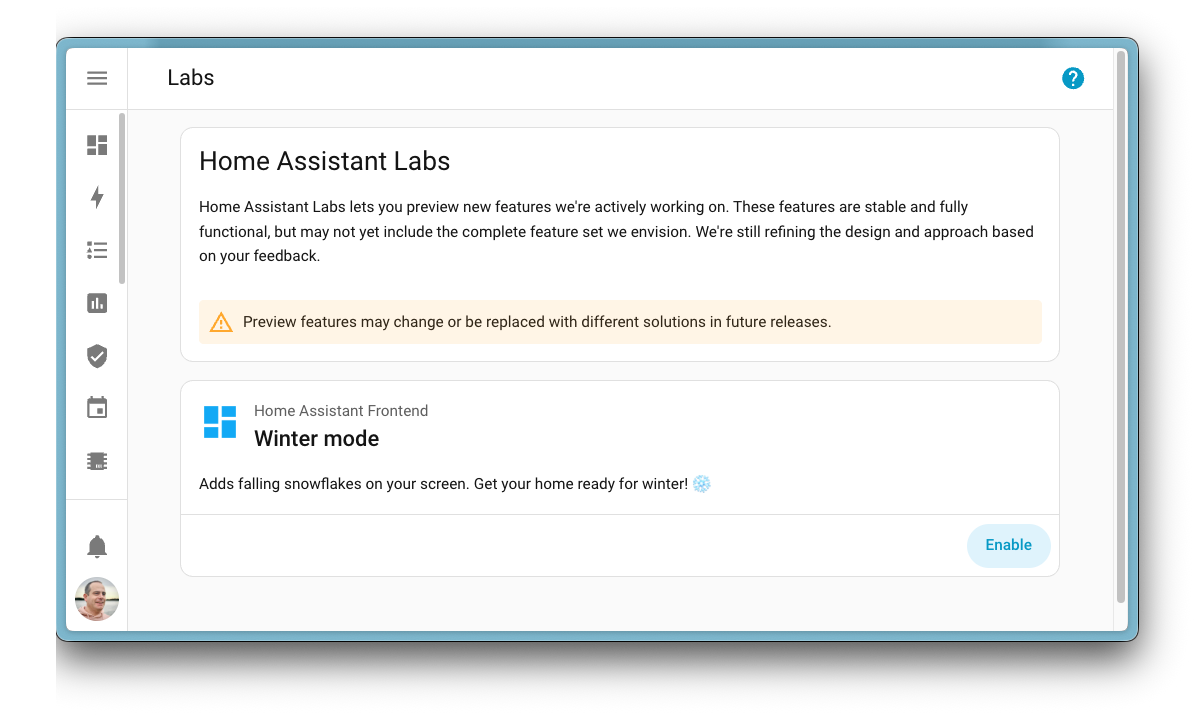
This month, we’re unveiling Home Assistant Labs, a brand-new space where you can preview features before they go mainstream. And what better way to kick it off than with Winter mode? ❄️ Enable it and watch snowflakes drift across your dashboard. It’s completely unnecessary, utterly delightful, and exactly the kind of thing we love to build. ❄️
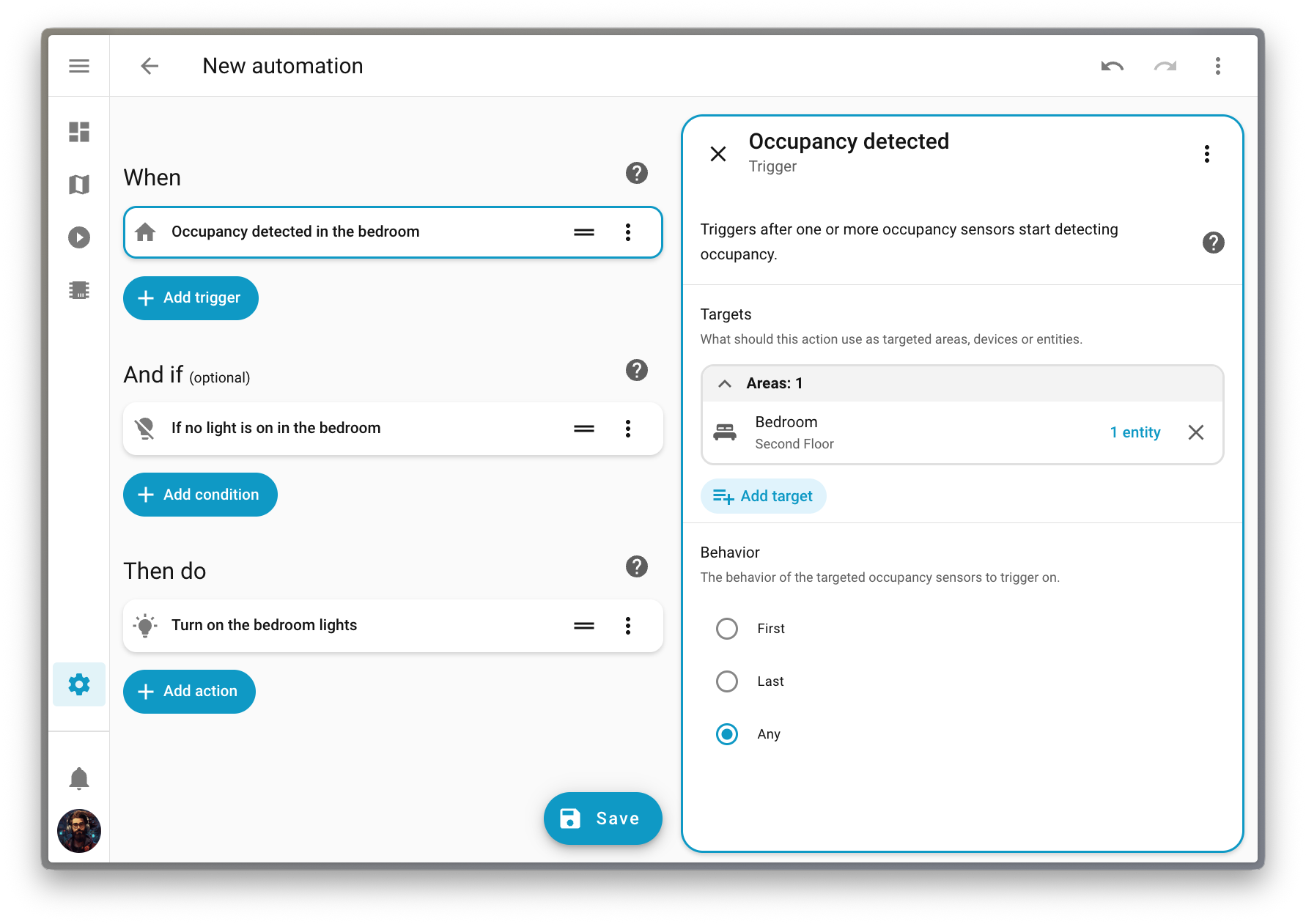
But that’s just the beginning. We’ve been working on making automationsAutomations in Home Assistant allow you to automatically respond to things that happen in and around your home. [Learn more] more intuitive over the past releases, and this release finally delivers purpose-specific triggers and conditions. Instead of thinking in (numeric) states, you can now simply say “When a light turns on” or “If the climate is heating”. It’s automation building the way our mind works, as it should be. 🧠
Oh, and if you’re looking to level up your Zigbee or Thread network, check out the Home Assistant Connect ZBT-2 we released last month. It’s four times faster and has a gorgeous new antenna design that you’ll actually want to display on your desk. 📡
From all of us working on Home Assistant:
Thank you for an amazing 2025! ❤️
Happy holidays, and enjoy the release!
../Frenck
A little holiday cheer 🎄🎶
Jingle Labs by Frenck and Darren
Dashing through the code,
With a brand-new Labs to show,
Snowflakes start to fall,
Watch the dashboard glow!
Triggers now make sense,
Conditions feel just right,
What fun it is to automate,
Your smart home every night!
Chorus
Jingle Labs, jingle Labs,
Features on the way!
Oh what fun it is to run,
Home Assistant every day, hey!
Jingle Labs, jingle Labs,
Winter mode is here!
Turn your lights on with a thought,
And spread some holiday cheer!
Power graphs are live,
Water meters too,
Dashboards you can set,
For every user’s view!
Xbox got some love,
Shelly’s platinum now,
Contributors came through this year,
Take a final bow!
Chorus
Jingle Labs, jingle Labs,
Triggers for the win!
Climate, lights, and fans galore,
Let the automations spin!
Jingle Labs, jingle Labs,
Thank you all so much!
Happy holidays from us,
Now go and automate stuff!
When we develop new features for Home Assistant, we often find ourselves in a tricky spot. A feature might be fully built and tested, but we’re not entirely sure if it’s the right fit for everyone just yet. Maybe we want to gather some real-world feedback first, or perhaps we want to see how the community uses it before committing to keeping it around forever.
That’s where Home Assistant Labs comes in! 🧪
Labs is a brand-new place in Home Assistant that gives you a sneak peek at features we’re working on. These are not unfinished experiments or unstable beta features. They are fully functional and tested, but they might change or even disappear based on feedback. We are committed to building in the open, and we want to give more people the choice to hop into the lab with us. By joining us, your feedback will directly help refine these features for the entire community.
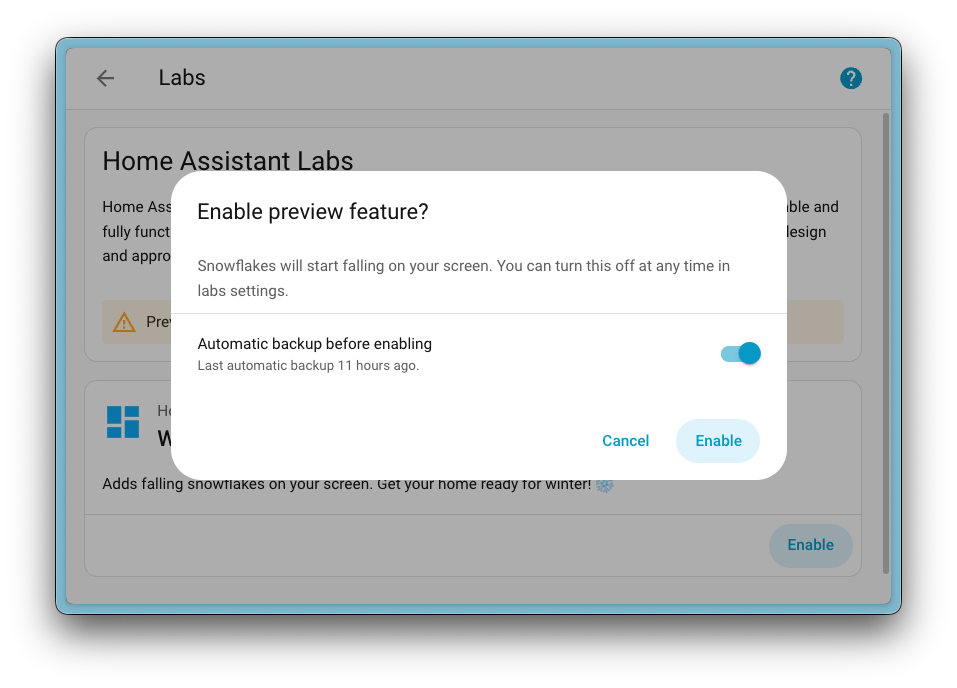
The very first preview feature available in Labs is Winter mode ❄️, inspired by a community post on Reddit originally created by u/Possible-Week-5815. Enable it, and watch your Home Assistant interface transform into a winter wonderland with falling snow. A fun way to get into the holiday spirit!
When you enable a preview feature, you can also choose to create a backup first, just to be safe. And if you change your mind? Simply disable it again. No restart required!
Preview features are off by default, and enabling them won’t affect your existing setup. It’s completely optional, so if you prefer to stick with the battle-proven experience, that’s totally fine. But if you’re curious and want to explore what’s coming next, Labs is the place to be.
But what was the first Labs preview feature we put in there? Well, it’s a big one…
Purpose-specific triggers and conditions
Almost two years ago, we released a new automationAutomations in Home Assistant allow you to automatically respond to things that happen in and around your home. [Learn more] editor that unwrapped all our actionsActions are used in several places in Home Assistant. As part of a script or automation, actions define what is going to happen once a trigger is activated. In scripts, an action is called sequence. [Learn more] and made them easier to understand. Instead of a single, obscure “Call service” action, you now see clear options like “Light: Turn on” or “Media Player: Set Volume”.
Ever since, we’ve been wondering: could we do the same for triggersA trigger is a set of values or conditions of a platform that are defined to cause an automation to run. [Learn more] and conditionsConditions are an optional part of an automation that will prevent an action from firing if they are not met. [Learn more]? Instead of relying on technical, state-based options, what if we could offer intuitive alternatives that just make sense? Options like “When a light turns on” or “If a light is on”.
That idea set a two-year plan in motion, and today it’s finally becoming a reality.
Along the way, we discovered something interesting: many of you take a “target-first” approach when building automationsAutomations in Home Assistant allow you to automatically respond to things that happen in and around your home. [Learn more]. You think about what you want to automate (a deviceA device is a model representing a physical or logical unit that contains entities., an entityAn entity represents a sensor, actor, or function in Home Assistant. Entities are used to monitor physical properties or to control other entities. An entity is usually part of a device or a service. [Learn more], or an areaAn area in Home Assistant is a logical grouping of devices and entities that are meant to match areas (or rooms) in the physical world: your home. For example, the living room area groups devices and entities in your living room. [Learn more]) before thinking about how to automate it (which action to perform or which trigger to use). This release embraces that mindset with a completely new way to build automations.
Purpose-specific triggers and conditions are now provided directly by domainsEach integration in Home Assistant has a unique identifier: The domain. It is often shown as the first part (before the dot) of entity IDs. like Light, Climate, Fan, and others, covering the most common automation use cases.
These new triggers and conditions fully support targeting. This means you can trigger an automation when any light in your living room turns on, without having to list them one by one or create a group beforehand. Targeting an area keeps things simple: it’s always aligned with how your home is organized, and you don’t have to update anything when you add or remove devices.
LabelsLabels in Home Assistant allow grouping elements irrespective of their physical location or type. Labels can be assigned to areas, devices, entities, automations, scenes, scripts, and helpers. Labels can be used in automations and scripts as a target for actions. Labels can also be used to filter data. [Learn more] are supported too! You can now check if any of your Christmas lights are on. Perfect timing for the holidays! 🎄
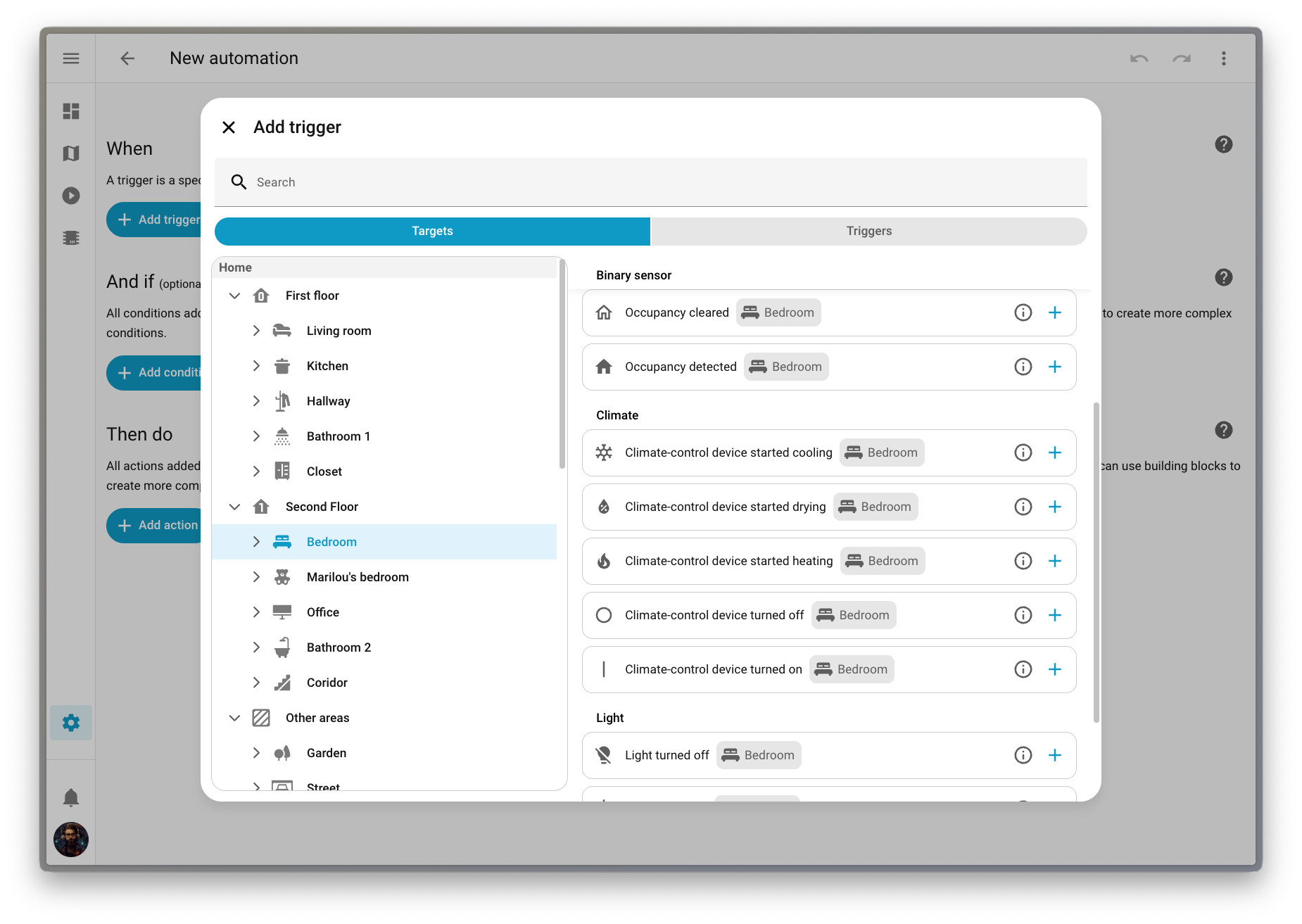
We’ve also introduced a new way to pick triggers, conditions, and actions that fits this target-first approach. You can navigate your home by floorA floor in Home Assistant is a logical grouping of areas that are meant to match the physical floors in your home. Devices & entities are not assigned to floors but to areas. Floors can be used in automations and scripts as a target for actions. For example, to turn off all the lights on the downstairs floor when you go to bed. [Learn more], then area, then device, and see exactly which options are available for each target. It’s a much more intuitive way to build automationsAutomations in Home Assistant allow you to automatically respond to things that happen in and around your home. [Learn more].
This feature is still being refined, so we’ve made it available as a preview feature in Labs. Head over to Settings > System > Labs to enable it and help us shape the future of automation building!
More dashboard improvements!
We have a lot of dashboard improvements to share in this release! From better default dashboard management to an improved Home dashboard, we have been busy making your Home Assistant experience even better.
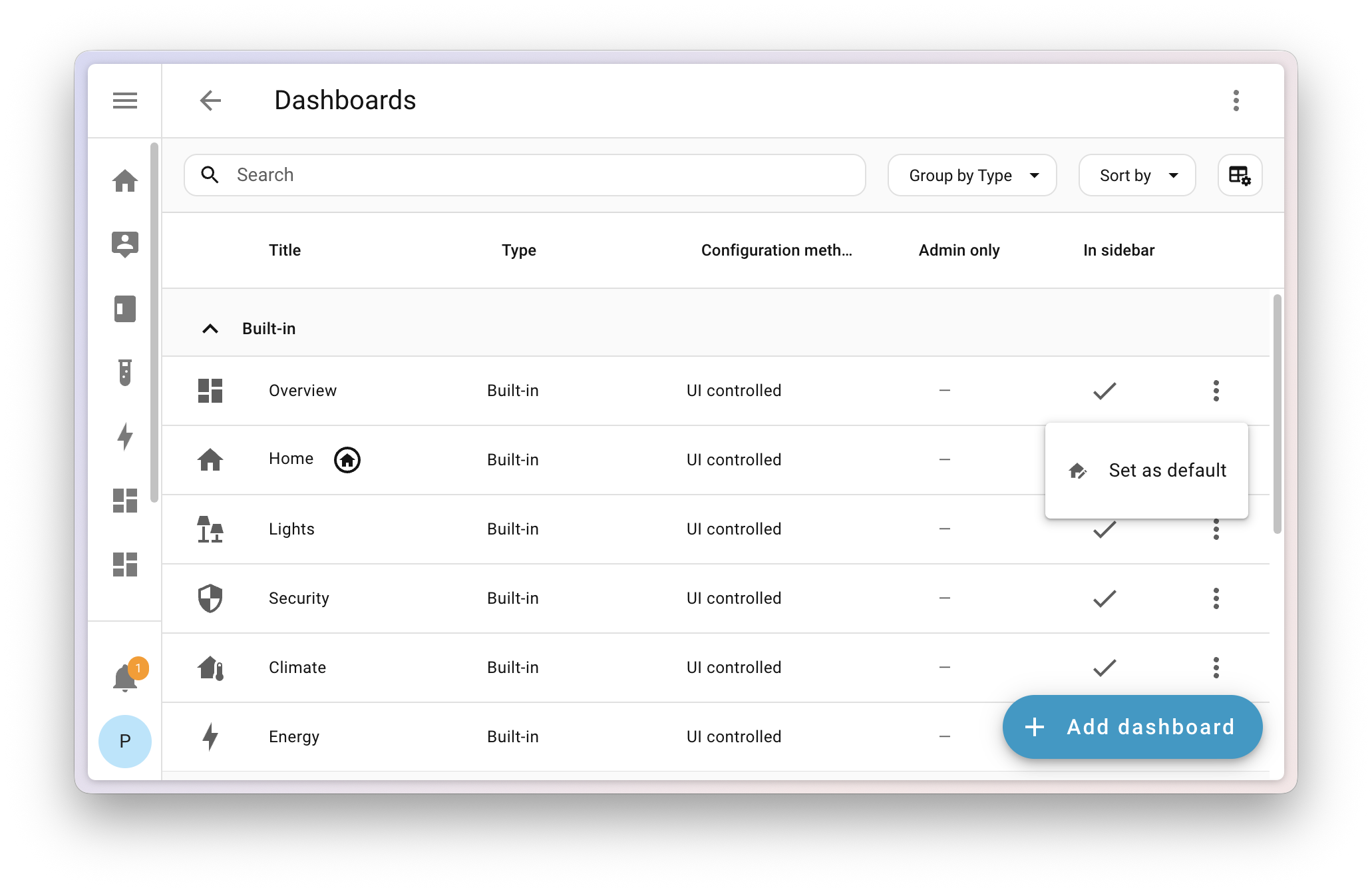
Set a system-wide default dashboard
Picking a default dashboard is now a system-level setting that takes effect instantly for all users on your Home Assistant installation. The dashboard you choose will appear at the top of the sidebar, replacing the current default.
But don’t worry, personal preferences still matter! We added a new setting in your User profile where you can override the system default and set your own preferred dashboard.
If you set your phone to one dashboard and your wall tablet to another, they’ll now both revert to the default dashboard. If you want your wall tablet to use a different dashboard than your other devices, we recommend giving it a separate user profile that you can customize however you want.
Reorder areas and floors
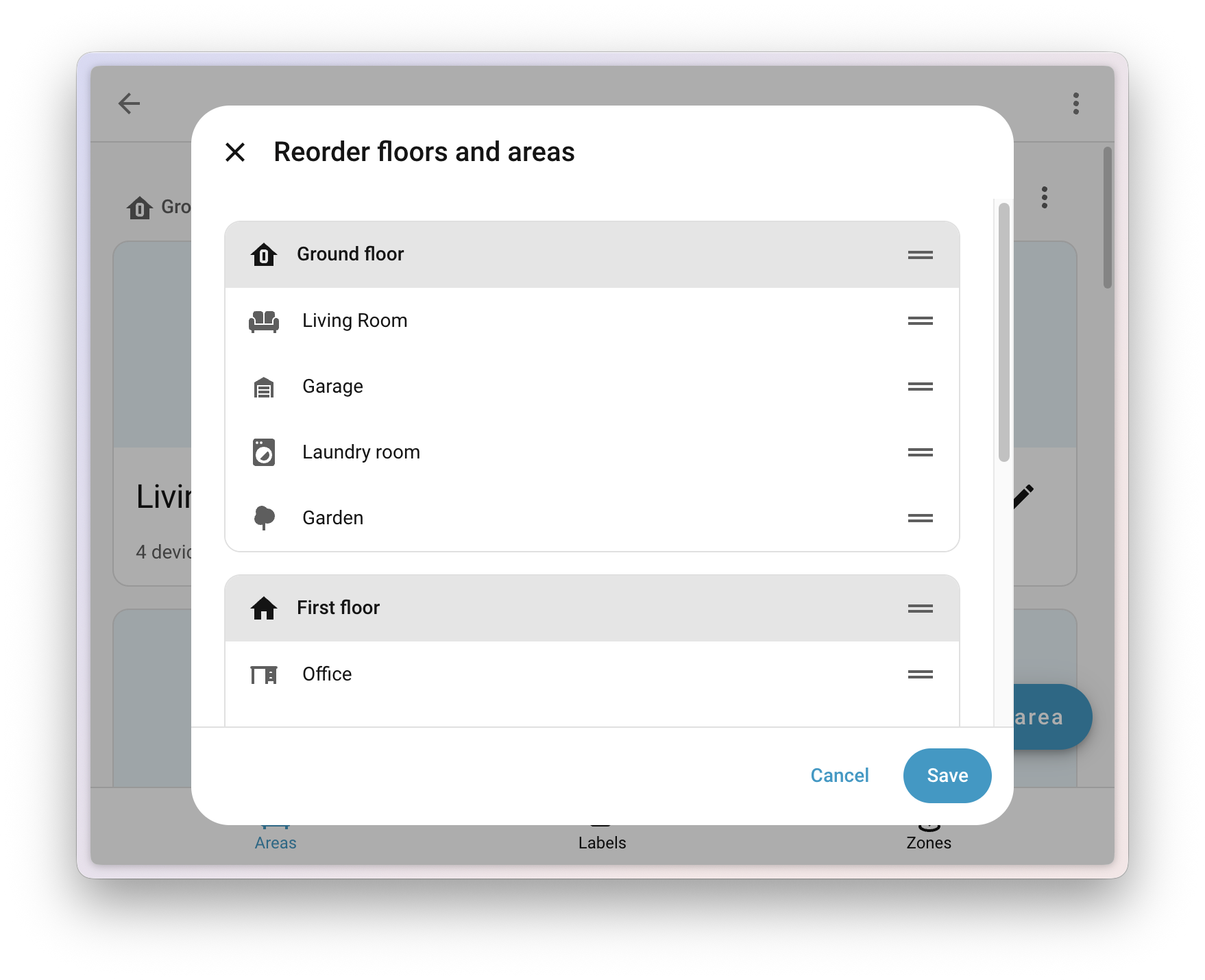
When using the built-in dashboard experiences (Home, Lights, Security, and others), one of the main pain points was the strict ordering of areasAn area in Home Assistant is a logical grouping of devices and entities that are meant to match areas (or rooms) in the physical world: your home. For example, the living room area groups devices and entities in your living room. [Learn more] (alphabetically) and floorsA floor in Home Assistant is a logical grouping of areas that are meant to match the physical floors in your home. Devices & entities are not assigned to floors but to areas. Floors can be used in automations and scripts as a target for actions. For example, to turn off all the lights on the downstairs floor when you go to bed. [Learn more] (numerically by level). This often didn’t make sense in a real home, where your guest bathroom shouldn’t appear before your living room, and the attic is rarely more relevant than the main floor.
Now you can go to Settings > Areas, labels & zones and use the new Reorder floors and areas menu to manually drag and drop any area or floor to reorder them. Your changes will instantly apply to all built-in dashboards that show areas and floors.
Experimental dashboards have graduated
With the launch of Labs, we retired the experimental flag from the dashboard creation list. The Home dashboard can now be found in the dashboard list (still not visible by default), and the Areas dashboard has evolved into Home, so we’ve removed it for now. If you’re using the Areas dashboard, it will continue to work; you just won’t be able to create another.
Note
We want to keep hearing your voice! Share your experience with us in the Home dashboard survey and help us improve every step of the way. And of course join us on Discord to work together on the future of dashboards.
Home dashboard improvements
We added a new sidebar to the Home dashboard that gathers quick access links we think are useful for you. There’s also a nicer area and floor layout that uses space more efficiently. On a more technical level, the Home dashboard is now a proper built-in dashboard and shows up in the dashboard list.
Important
There is a chance your current favorites might disappear in this release and need to be re-added. This is due to the migration of this dashboard from a strategy to a built-in dashboard.
Undo and redo in the dashboard editor
The dashboard editor now includes the undo and redo feature that we added in 2025.10 to the automationAutomations in Home Assistant allow you to automatically respond to things that happen in and around your home. [Learn more] and scriptScripts are components that allow users to specify a sequence of actions to be executed by Home Assistant when turned on. [Learn more] editor. This allows you to experiment safely while editing your dashboards. You can undo up to 75 changes or restore them with a single click, making editing dashboards faster and less stressful.
Thanks to @jpbede for implementing this handy feature!
Power and water in the Energy dashboard
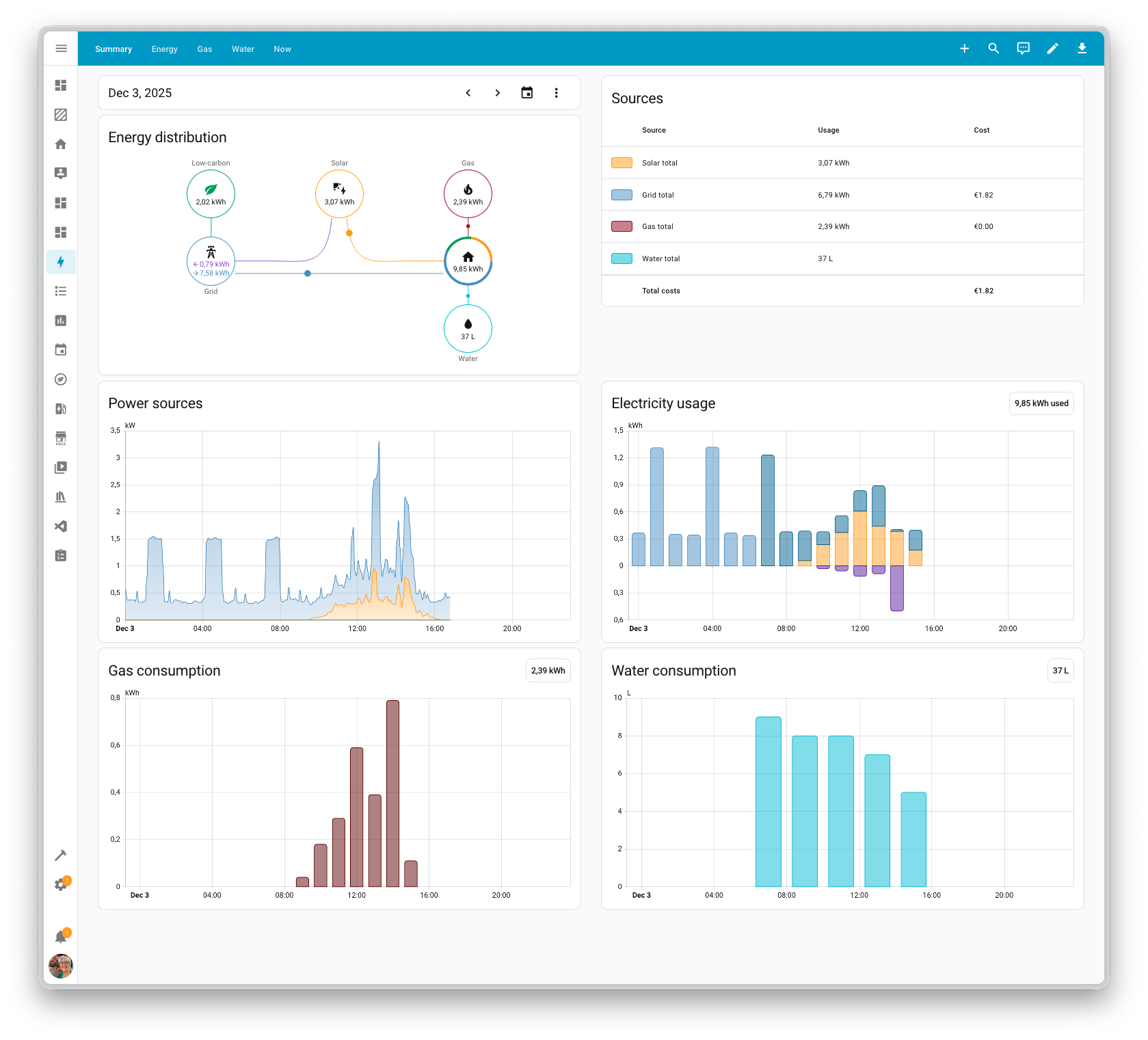
The Energy dashboard has been helping you track your energy and gas usage for years now, and this release brings two great additions: real-time power monitoring and downstream water tracking.
Real-time power monitoring
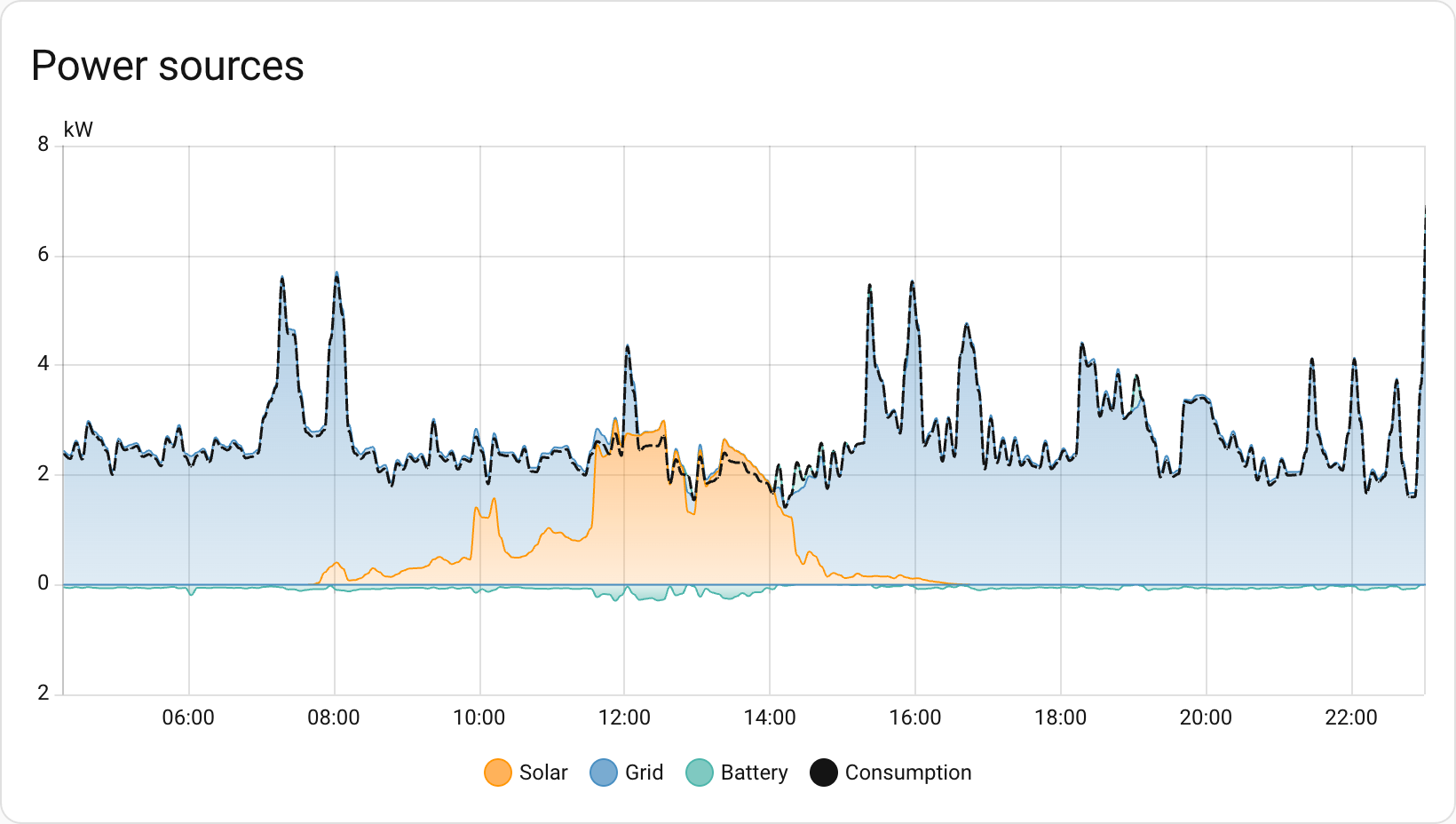
Until now, the Energy dashboard was all about energy: the cumulative kWh you’ve consumed or produced over time. But sometimes you want to know what’s happening right now. How much power is that appliance actually drawing? Is your solar system producing at this very moment?
With this release, you can now configure power sensors alongside your energy sensors. Track your real-time grid consumption, see how much you’re exporting back to the grid, and watch those watts flow in real-time. The power configuration options now appear alongside energy settings for each source or device, and new power graphs let you see your power consumption throughout the day.
Downstream water meters
The Energy dashboard has been tracking your water consumption for a while now, but it was missing something: the ability to see where all that water is actually going. Just like you can track individual devices for energy consumption, you can now add downstream water meters to break down your water usage.
Got a smart irrigation controller? A water softener with a flow meter? A separate meter for your pool? Now you can track them all and see exactly how your water consumption is distributed across different uses.
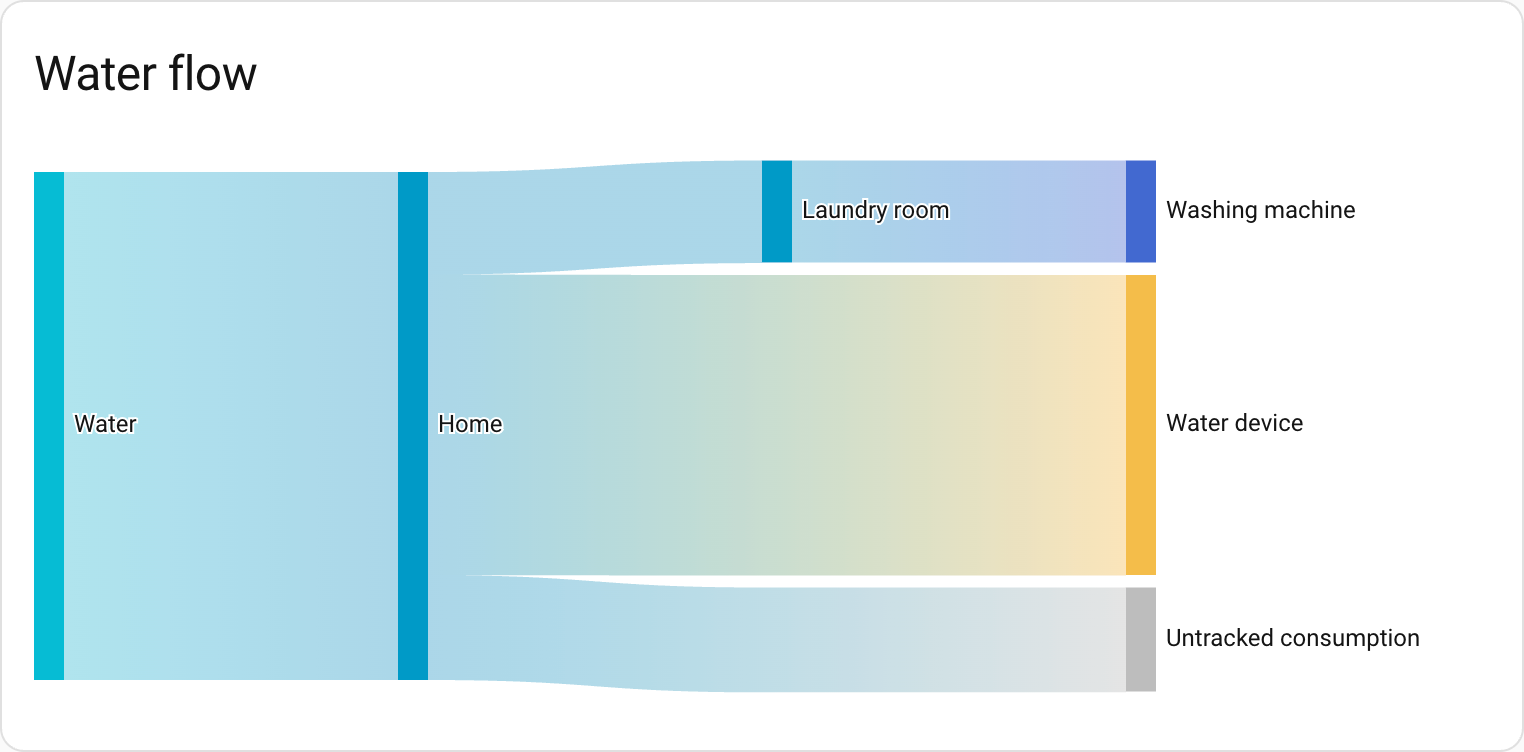
There’s also a brand-new water sankey card that visualizes your water flow, just like the energy sankey diagram you already know. It’s a great way to see where your water is going at a glance.
The new water sankey card shows where your water is going at a glance.
New energy layout
To make room for this new functionality, the Energy dashboard has been reorganized. Don’t worry: if you only have energy configured, you’ll still see the same dashboard. But if you add water, gas, or power, the dashboard will be split into several tabs.
Integrations
Thanks to our community for keeping pace with the new integrationsIntegrations connect and integrate Home Assistant with your devices, services, and more. [Learn more] and improvements to existing ones! You’re all awesome 🥰
New integrations
We welcome the following new integrations in this release:
Airobot, added by @mettolen
Control and monitor your Airobot smart thermostats for intelligent floor heating control via the local REST API.
Anglian Water, added by @pantherale0
Integrate your Anglian Water smart water meter to track water usage and consumption costs.
Backblaze B2, added by @ElCruncharino
Use a Backblaze B2 cloud storage bucket as a backup location for your Home Assistant backups.
EnergyID, added by @Molier
Sync anything from your home directly to EnergyID for advanced analytics, performance tracking and benchmarking.
Essent, added by @jaapp
Monitor dynamic electricity and gas prices for Essent customers in the Netherlands with variable pricing contracts.
Google Air Quality, added by @Thomas55555
Get real-time air quality data for your location using Google’s Air Quality API.
Google Weather, added by @tronikos
Use Google Weather as a source for weather data, providing current conditions, hourly forecasts for the next 24 hours, and daily forecasts for the next 10 days.
Hanna, added by @bestycame
Fetch pool water quality data from your Hanna Pool Controller device, including pH, chlorine levels, ORP values, and water temperature.
Home Assistant Labs, added by @frenck
A dedicated panel where you can preview and test new features before they become standard in Home Assistant.
Philips Hue BLE, added by @flip-dots
Control your Philips Hue Bluetooth lights directly with Home Assistant, without the need for a Hue Bridge.
Saunum, added by @mettolen
Integrate your Saunum Leil sauna control unit to precisely control temperature and monitor your sauna’s operation.
Victron BLE, added by @rajlaud
Integrate Victron Energy devices that support the Bluetooth Low Energy protocol for real-time monitoring.
This release also has new virtual integrations. Virtual integrations are stubs that are handled by other (existing) integrations to help with findability. These ones are new:
It is not just new integrationsIntegrations connect and integrate Home Assistant with your devices, services, and more. [Learn more] that have been added; existing ones are also being constantly improved. Here are some of the noteworthy changes to existing integrations:
@piitaya updated the ESPHome integration to let Home Assistant generate entity IDs using its standard rules, aligning it with how other integrations work.
Thanks to @bdraco, you can configure Wi-Fi on Shelly generation 2+ devices directly from Home Assistant via Bluetooth.
Shelly now supports control modes for upcoming Shelly Cury devices. Nice work, @bieniu!
The Tuya integration received a lot of love! Cat litter boxes now expose switches, buttons, lights, and sensors for controlling your pet’s automated litter box. On top of that, doorbell events are now supported too. Thanks, @heindrichpaul!
@starkillerOG expanded the Reolink integration with an exposure mode select and audio noise reduction controls for supported cameras.
Air conditioner and microwave support has landed in the Home Connect integration, expanding the range of supported BSH appliances. Thanks, @Diegorro98!
@zerzhang added support for the SwitchBot smart thermostat radiator to the SwitchBot integration. Nice!
The Xbox integration got some love from @tr4nt0r! You can now link multiple Xbox accounts, track how many friends you (and your friends) have, see if they’re in a party, and control more remote functions. The media browser also gained a new category showcasing official game art and screenshots.
Got an Ecovacs robot? The Ecovacs integration now has a border spin switch (to reach those tricky edges while mopping) and an auto-empty select entity. Thanks, @aronnebrivio!
The VeSync integration gained a child lock switch, giving you control over this safety feature for your devices. Thanks, @cdnninja!
The SQL integration now supports using templates in your queries, giving you more flexibility when querying your databases. Great addition, @gjohansson-ST!
@tomwilkie expanded the Prometheus integration to export metrics for the water_heater domain.
The Anthropic integration now supports AI task entities. Thanks, @Shulyaka!
Portainer can now show you resource usage of your containers. Nice work, @erwindouna!
@thomasddn added a button to enable reduced guard mode for compatible vehicles to the Volvo integration.
The Plugwise integration now supports the new Anna P1 device and gained a select entity for zone profiles on Adam devices. Thanks, @bouwew!
Bang & Olufsen users can now use their Beoremote One with Home Assistant. The remote’s buttons are exposed as event entities. Awesome, @mj23000!
One thing we are incredibly proud of in Home Assistant is our integration quality scale. This scale helps us and our contributors to ensure integrations are of high quality, maintainable, and provide the best possible user experience.
This release, we celebrate several integrationsIntegrations connect and integrate Home Assistant with your devices, services, and more. [Learn more] that have improved their quality scale:
This is a huge achievement for these integrations and their maintainers. The effort and dedication required to reach these quality levels is significant, as it involves extensive testing, documentation, error handling, and often complete rewrites of parts of the integration.
A big thank you to all the contributors involved! 👏
Now available to set up from the UI
While most integrationsIntegrations connect and integrate Home Assistant with your devices, services, and more. [Learn more] can be set up directly from the Home Assistant user interface, some were only available using YAML configuration. We keep moving more integrations to the UI, making them more accessible for everyone to set up and use.
The following integration is now available via the Home Assistant UI:
The following integrationsIntegrations connect and integrate Home Assistant with your devices, services, and more. [Learn more] are no longer available as of this release:
Dominos Pizza: The Dominos Pizza integration has been removed. The integration no longer functions and its underlying source has been unmaintained since 2019.
Flick Electric: The Flick Electric integration has been removed. All customers of the Flick Electric company have already been moved to Meridian Energy. The service this integration used is already non-functional.
The following integrations have been removed as they are incompatible with the currently supported installation methods:
Bluetooth Tracker
CUPS
Decora
dlib Face Detect
dlib Face Identify
Eddystone Temperature
GStreamer
Keyboard
LIRC
Pandora
Raspberry Pi Camera
SMS
Snips
TensorFlow
Other noteworthy changes
There are many more improvements in this release; here are some of the other noteworthy changes:
New template math functions! @akx added clamp, wrap, and remap to manipulate numbers in your templates. Awesome!
The activity card now supports filtering by state, making it easier to see specific events. Nice one, @karwosts!
@MindFreeze added min and max options to the bar gauge feature for tile cards, giving you more control over the gauge range.
You can now delete helpers directly from the helpers panel, without having to open them first. Thanks, @frenck!
The blueprints panel now shows how many automations and scripts use each blueprint. Great for keeping track, @EarMaster!
@timmo001 added a handy trick: double-click the automation editor sidebar to reset its width.
Labels now show up on the device information card, making it easier to see how your devices are organized. Thanks again, @timmo001!
Get insight into your AI conversations
Ever played around with AI in Home Assistant and wondered what data is actually being sent?
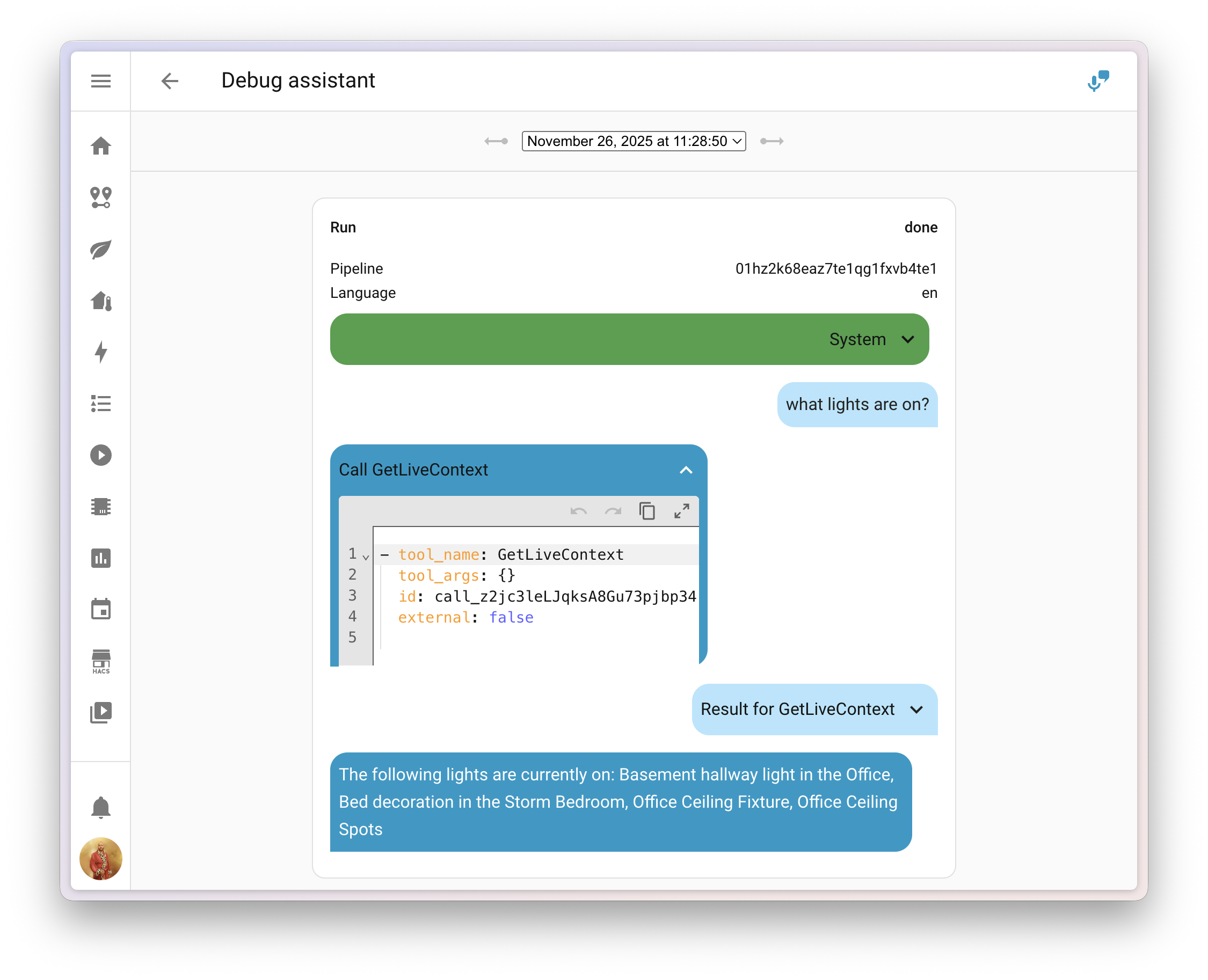
@balloob upgraded the voice assistant debug interface, and you can now inspect the system prompt that tells the AI how to behave, along with any tool calls it made to generate your answer.
This makes it much easier to figure out why the AI decided to skip over that one entityAn entity represents a sensor, actor, or function in Home Assistant. Entities are used to monitor physical properties or to control other entities. An entity is usually part of a device or a service. [Learn more], or why it called a specific tool. You can find the debug interface in the voice assistant configuration panel.
Add entities to Android widgets and favorites
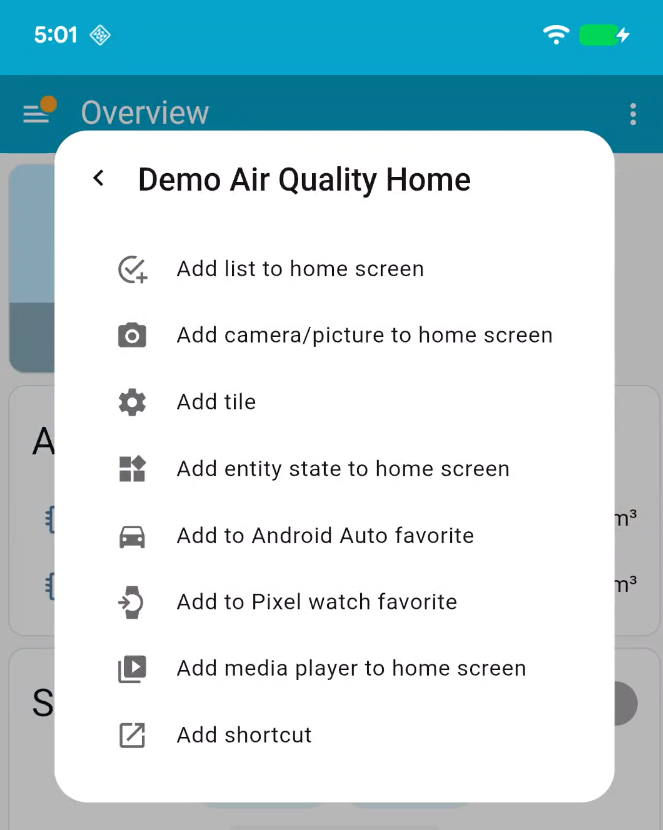
If you’re using the Home Assistant Companion app for Android, there’s a handy new feature waiting for you! Starting with app version 2025.11, you can now add entitiesAn entity represents a sensor, actor, or function in Home Assistant. Entities are used to monitor physical properties or to control other entities. An entity is usually part of a device or a service. [Learn more] to widgets and Android Auto favorites directly from the entity’s more info dialog.
With just a few taps, you can:
Add widgets for quick control of entities right from your home screen
Set entities as Android Auto favorites, making them quickly accessible in your car
No more deep-diving into app settings! The Add to option appears in the more info dialog with options tailored to the entity you’re viewing. For example, adding a media player widget is only available for media players.
This is a first step in integrating native mobile features directly into the Home Assistant interface. Future releases will expand this with support for creating shortcuts, tiles, and watch favorites.
We will also release patch releases for Home Assistant 2025.12 in December. 🎄
These patch releases only contain bug fixes. Our goal is to release a patch
release once a week, aiming for Friday.
Home Assistant has a great community of users who are all more than willing to help each other out. So, join us!
Our very active Discord chat server is an excellent place to be, and don’t forget to join our amazing forums.
Found a bug or issue? Please report it in our issue tracker to get it fixed! Or check our help page for guidance on more places you can go.
Are you more into email? Sign up for the Open Home Foundation Newsletter to get the latest news about features, things happening in our community, and other projects that support the Open Home straight into your inbox.
Backward-incompatible changes
We do our best to avoid making changes to existing functionality that might unexpectedly impact your Home Assistant installation. Unfortunately, sometimes it is inevitable.
We always make sure to document these changes to make the transition as easy as possible for you. This release has the following backward-incompatible changes:
Core and Supervised installation methods, and 32-bit systems
After a 6-month deprecation period, support for the Home Assistant Core and Home Assistant Supervised installation methods, as well as all 32-bit system architectures (i386, armhf, and armv7), has now been fully removed.
These installation methods and architectures will no longer receive updates, including security updates. If you are still using one of these installation methods or architectures, please migrate to a supported installation method and architecture as soon as possible to continue receiving updates and support.
Hive has removed support for their security products. We have removed the alarm control panel from the integration, as the Hive APIs no longer support these products.
The legacy license plate event sensor has been removed from the UniFi Protect integration, as it no longer functions with Protect 6 and newer. The UniFi Protect integration has not been compatible with Protect versions older than 6 for quite some time.
This sensor has been replaced with a new Vehicle Detection Event entity that provides significantly more functionality, including license plate recognition, vehicle type detection, color detection, and confidence scores. The new event entity fires with a 3-second delay to ensure optimal thumbnail and LPR data quality.
The Xbox media browser has been completely overhauled to support multiple accounts and introduce a range of other improvements. As part of this update, the format of the media-source identifiers has been changed as well.
The following and followers sensors introduced in the last release previously included friends in their counts. After a recent API update, friends are no longer included.
If you are a custom integration developer and want to learn about changes and new features available for your integration: Be sure to follow our developer blog. The following changes are the most notable for this release:
Dec 4, 09:00 UTC Completed - The scheduled maintenance has been completed.
Dec 4, 06:00 UTC In progress - Scheduled maintenance is currently in progress. We will provide updates as necessary.
Dec 3, 21:36 UTC Update - We will be undergoing scheduled maintenance during this time.
Dec 3, 15:32 UTC Scheduled - The Linode API will be undergoing scheduled maintenance during this time. We will be monitoring this to ensure that the service is stable. If you experience issues, open a Support ticket, please call us at 855-454-6633 (+1-609-380-7100 Intl.), or send an email to support@linode.com.
![[personal profile]](https://www.dreamwidth.org/img/silk/identity/user.png)
![[syndicated profile]](https://www.dreamwidth.org/img/silk/identity/feed.png) whatever_scalzi_feed
whatever_scalzi_feed






 The new water sankey card shows where your water is going at a glance.